

Find your credentials

You need two values from your Adaptive deployment:
CredentialDescription
ADAPTIVE_URLYour deployment URL
ADAPTIVE_API_KEYYour personal API key

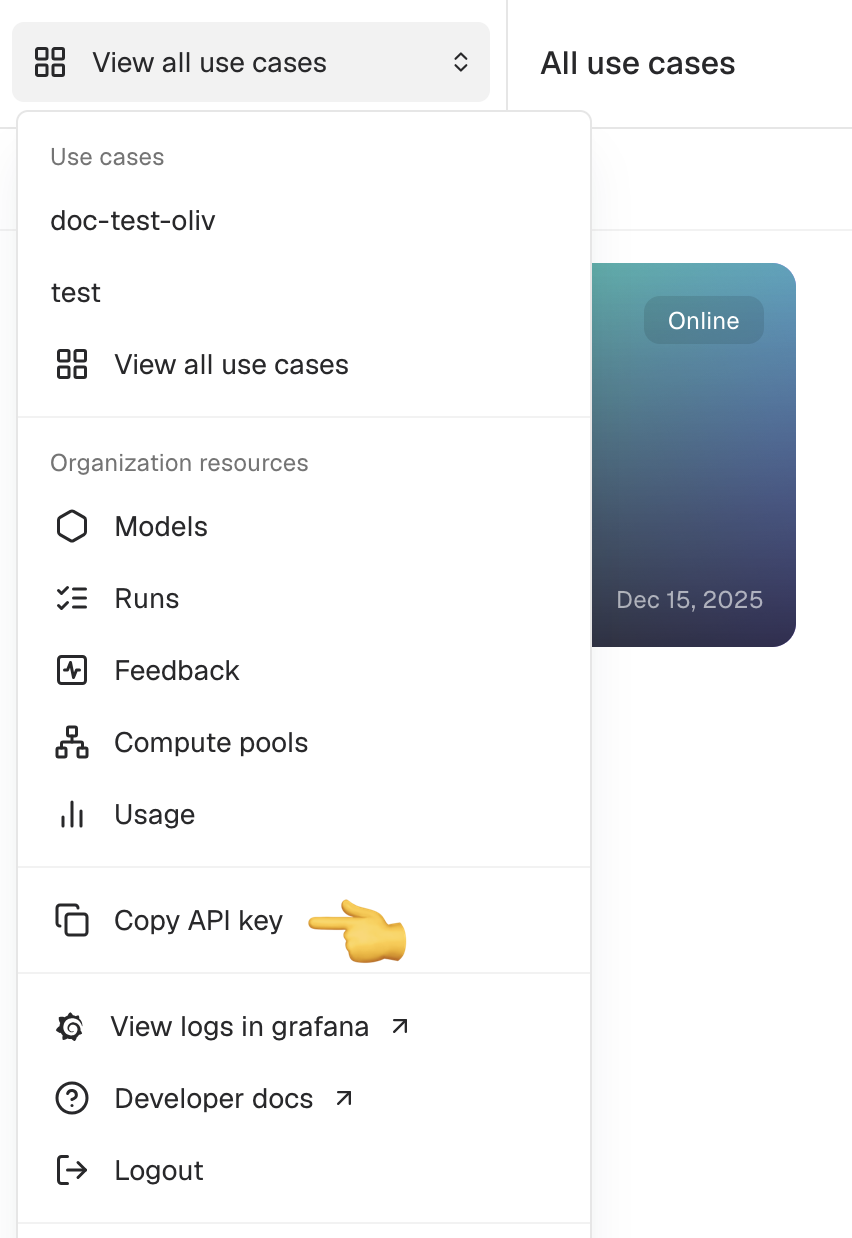
Copy your API key from the top left navigation switcher

Click the navigation switcher in the top left corner (labeled View all use cases) to reveal your API key. Your deployment URL is provided by your administrator.

Set environment variables

export ADAPTIVE_URL="https://your-deployment.adaptive-ml.com"
export ADAPTIVE_API_KEY="your-api-key"
The SDK and HTTP clients use these environment variables to connect to Adaptive.
Use the OpenAI Python library with your Adaptive deployment:
import os
from openai import OpenAI

client = OpenAI(
    base_url=f"{os.environ['ADAPTIVE_URL']}/api/v1",
    api_key=os.environ["ADAPTIVE_API_KEY"],
)

response = client.chat.completions.create(
    model="use_case_key/model_key",
    messages=[{"role": "user", "content": "Hello!"}],
)
Set model to use_case_key/model_key.
Include your API key in the Authorization header:
Authorization: Bearer ADAPTIVE_API_KEY
curl "$ADAPTIVE_URL/api/v1/chat/completions" \
  -X POST \
  -H "Content-Type: application/json" \
  -H "Authorization: Bearer $ADAPTIVE_API_KEY" \
  -d '{
    "model": "use_case_key/model_key",
    "messages": [{"role": "user", "content": "Hello!"}]
  }'