Overview
Progress reporting allows you to track and display the progress of your recipe’s execution in Adaptive Engine. This is useful for long-running recipes where you want to monitor how much work has been completed and how much remains.
Progress reporting consists of two main components:
- Define stages: Define logical phases of your recipe execution up-front
- Update progress: Report completion status for each stage
Defining Stages
Use ctx.job.register_stages() to define the stages of your recipe:
Stages are displayed in the order they are registered and represent logical phases of your recipe execution.
Reporting Progress
Generic notifier
Adaptive Engine provides a simple interface to report progress, which you can access via RecipeContext (generally shown as the ctx input parameter):
This will update the Adaptive run details UI to show you are now at 5% completion on the “Generating grades” stage (50/1000 are done).
Stage-specific notifier
If you don’t want to constantly pass a “stage” parameter, you can create a StageNotifier, which is a copy of ctx.job that holds a default stage. AllTraining classes take in an optional stage_notifier parameter, which - as the name indicates - must be a stage-bounded notifier. This means you can follow the progress of training in # training samples processed from the Adaptive UI without having to edit the Trainer classes.
Single even notifications
Finally, it’s frequent that you just want to report that something happened in your recipe, not necessarily that ”# X out of a total # Y” samples/steps have been processed. A good example is reporting that a model has been spawned, which is a milestone in the recipe, but is a single action. For these cases, to decrease code verbosity you can use the SimpleProgressNotifier progress manager:
SimpleProgressNotifier works in both synchronous and asynchronous contexts.
Visualizing progress on the Adaptive UI
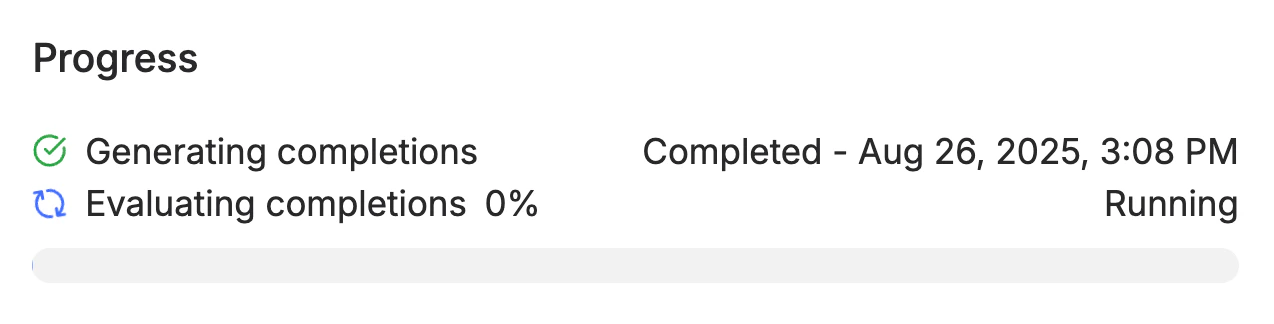
Once you have define your progress reporting strategy, uploaded and launched your recipe, the stages and progress will be displayed as below in the adaptive Engine:
The example above illustrate the reporting defined with the code below: