

Overview
Reward Servers let you deploy your own grading function implementation as an external server. You can expose this server via API, which Adaptive Engine must be able to access via Websocket. Although reward servers support any arbitrary reward, they are especially useful when your reward depends on external systems like databases, simulated environments, or sandboxes, where feedback from execution or interaction is available.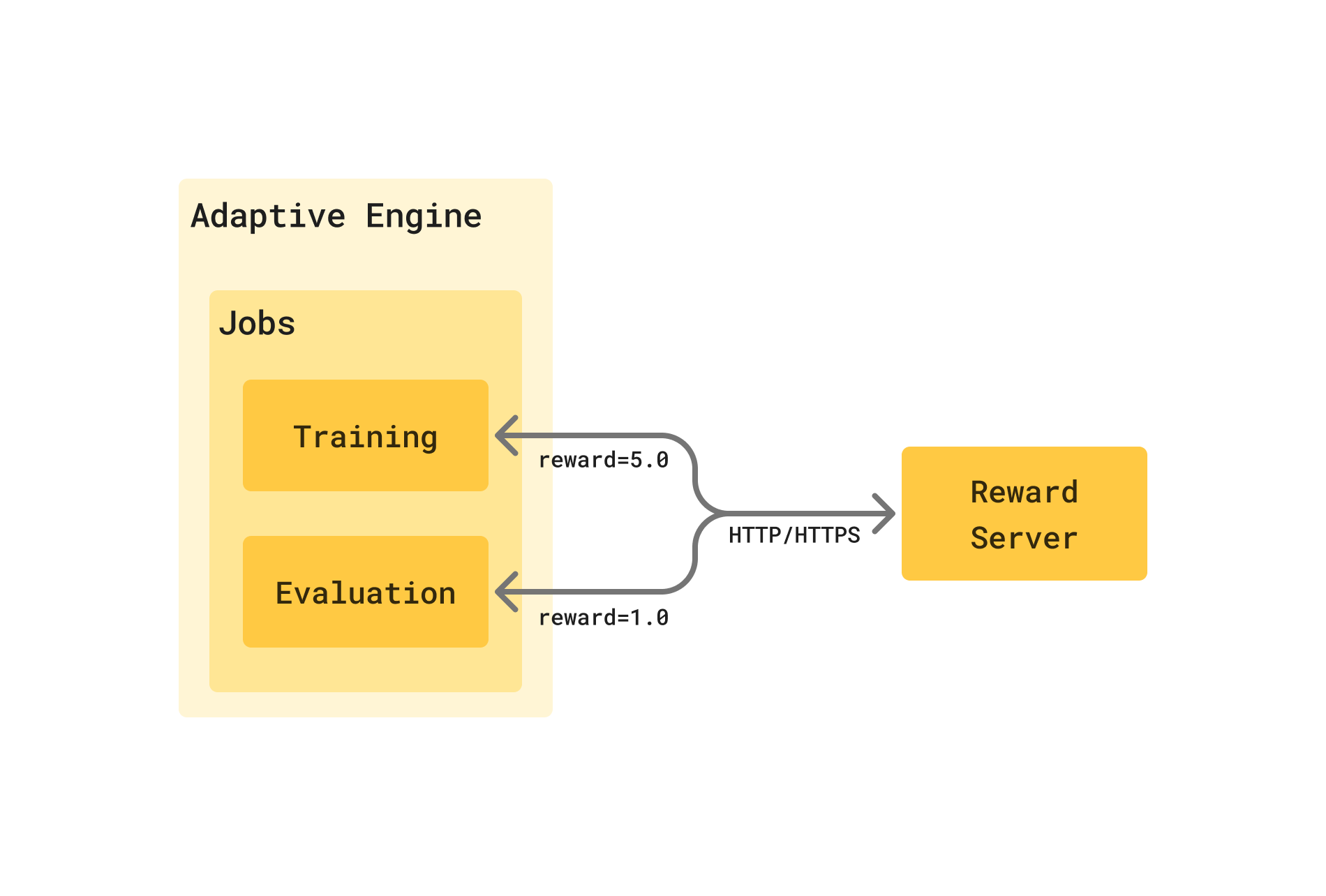
Building a Reward Server
Implementation guide
The Adaptive SDK includes aRewardServer base class built on top of FastAPI that handles all the server-side functionality required to deploy a reward server.
RewardServers allow you to optionally define an input schema that enforces the existence of metadata required for reward scoring. For example, a ground truth computed_result would be needed if we were training a model to solve math problems. When a training job is launched, Adaptive Engine polls your reward server for its required metadata schema, and validates that every record in the selected dataset includes this metadata, cancelling the job launch if they don’t. This allows you to decouple the reward scoring logic from the job that you’re running, and guarantee data validation by design.
To create your own reward server, you need to:
- Define a metadata class (or use the
EmptyMetadataclass if your reward function doesn’t require metadata) - Implement a subclass of
RewardServerwith:- An implementation of the
scoremethod, which computes the reward for a single sample - An implementation of the
infomethod, which provides server metadata back to Adaptive Engine
- An implementation of the
score and info methods:
scoretakes aValidatedRequestobject, which represents one of the records in your dataset.turnsis the full conversation history, andmetadatais the metadata object you defined.scorereturns aResponseobject, which contains therewardattributed to the record and an optionalmetadatadictionary, which you can use to return any information you want from the server, including detailed feedback or error messages.inforeturns aServerInfoobject, which contains the server version, name and description. Adaptive Engine uses this information to register your server and display it in the UI.
Example servers
Hello World
Let’s create a toy reward server that rewards samples based on whether a “scary letter” appears in the model’s completions, which is specific to each sample.scary_letter_reward_server.py
Hello World (no metadata)
If your reward function doesn’t need any additional metadata, you can use theEmptyMetadata class:
no_metadata_reward_server.py
SQL Query Execution
This more realistic example creates a reward server for a Text-to-SQL task. The reward server:- Takes the correct ground truth result for the prompt as metadata
- Executes the model’s generated SQL query against a SQLite database
- Compares the results and assigns a reward of:
1.0if the results match0.0if they don’t-1.0if the query is invalid, throws an execution error, or the model’s response is not a valid SQL query
sql_reward_server.py
Test your reward server locally
You can use the SDK’sRewardClient to test your reward server locally before deploying it for production use in Adaptive Engine. This allows you to easily build test cases and verify that your server returns the correct rewards for different inputs.
As an example, after running the scary-letter-reward-server.py example server above, you can test it with the following client:
local_reward_server_test.py
batch_score method to score multiple requests at once.
Deploy a reward server
Your reward server needs to be accessible to Adaptive Engine over HTTP or HTTPS. You have several deployment options:- Local development/testing: For initial development and testing, you can use a tool like ngrok to expose your local server and test integration and access.
- Bare metal deployment: Deploy and run your server on bare metal
- Containerization: Package your server as a Docker container and deploy to a cloud container service or orchestrator like Kubernetes
requirements.txt
Dockerfile
Docker Compose
If deploying Adaptive Engine on a single node with Docker Compose, you can add the following to the docker-compose.yml file:docker-compose.yml
http://sql-reward-server:50056.
2 details that worth mentioning:
- you can add a
portssection to expose the server on a specific host port, in case you deploy the server separately from Adaptive Engine (or even a different node) - you can add a
volumessection to mount a volume from a host machine/NFS share to the container, in case you don’t want to include the SQLite databases in the container
Kubernetes
If deploying Adaptive Engine on Kubernetes, you can easily add a deployment and service for your SQL reward server by applying the following manifest:sql-reward-server.yml
http://sql-reward-server:50056 if running in the same namespace, or http://sql-reward-server.<reward-server-namespace>.svc.cluster.local:50056 if running in a different namespace.
Connect a reward server to Adaptive Engine
The Adaptive SDK provides methods to test that the Adaptive control plane can access your reward server, as well as to register it with Adaptive Engine. After registering your reward server, you can use it in any training or evaluation job by specifying its key. To test that the Adaptive control plane can access your reward server:test_reward_server_integration.py
admin_reward_servers.py