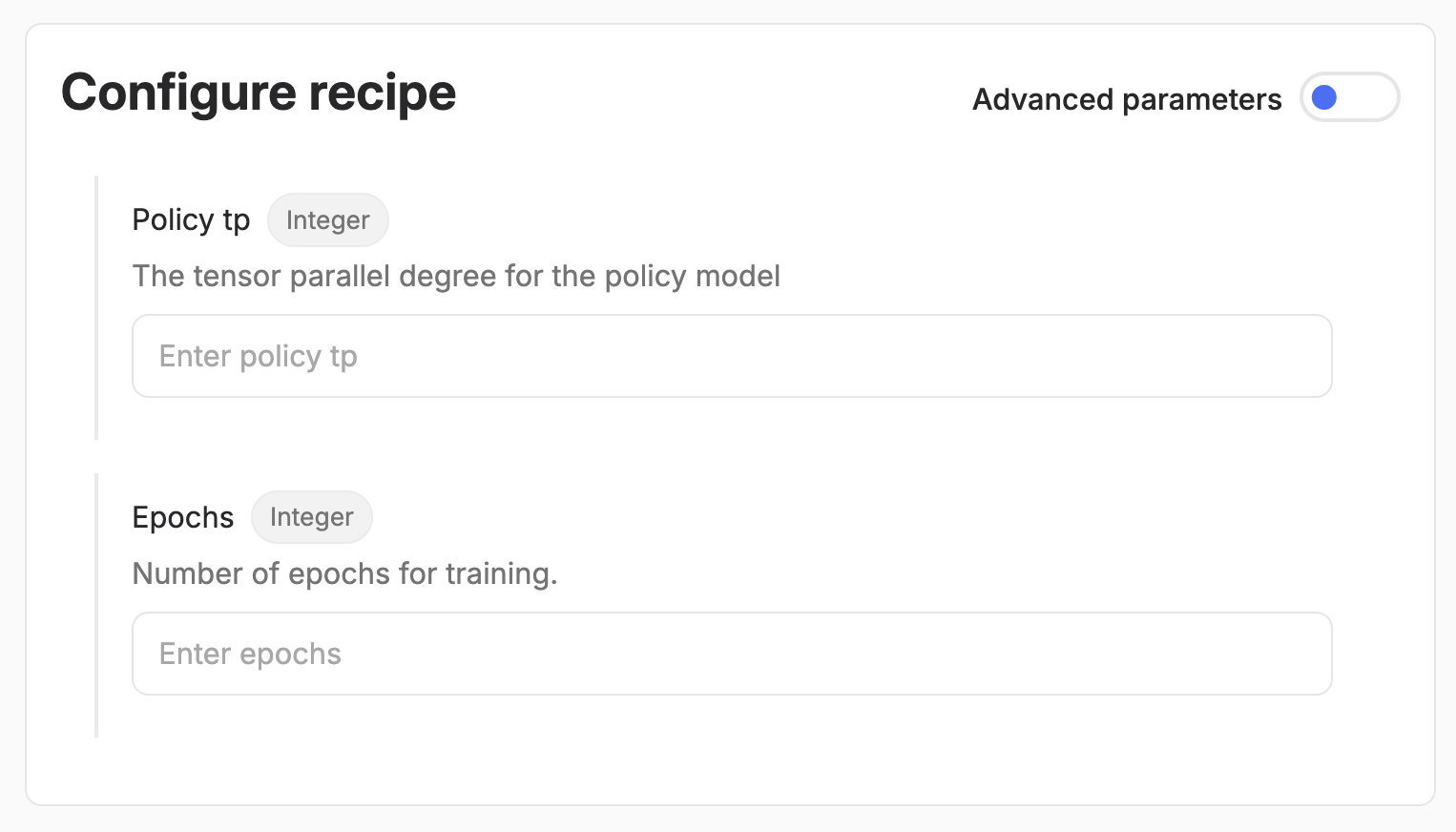
Recipe input configurations allow you to define the input interface to your recipes in Python code, and have it automatically transformed it into UI components, through which you can then launch the recipe in no-code style. This presents a number of benefits:
- flexibility: run the same recipe with different parameters without modifying the code
- reusability: recipes can be parametrized in such a way that they can be used for different use cases all together (good examples of this are the generic prebuilt recipes, which support any dataset or use case)
- self-documentation: if you write an input config class once, your recipe and all of its input parameters are automatically documented, both for business and technical users, in code and in the UI.
Basic configuration structure
Every recipe configuration inherits from a magic class InputConfig and defines the parameters your recipe expects in the same way as Pydantic models. Only the configuration classes that inherit from InputConfig in your code get automatically transformed into UI widgets.
Above is an example of parameter selection in the UI for a config defined in the custom recipe as. You can set the description, title and default value for the resulting widget by using typing.Annotated and pydantic.Field as shown below.
When users run your recipe, by default they will only be forced to input the values for which you have not set defaults. This allows you to simplify the input interface to your recipe as much as possible, leaving the user only with the mandatory decision to be made, while also enabling the flexibility to change fine-grained parameters if needed.
Using your configuration
Once you’ve defined your configuration class, you can pass it to your @recipe_main method (the input configuration must be the first parameter of the function, before the RecipeContext). When you run your recipe with input parameters, Adaptive Engine will create a typed and validated input object, and call @recipe_main with an instantiated MyConfig class.
Supported field types
Type annotations in your config parameters allow Adaptive to validate user input and make sure widgets render correctly according to their type in the UI.
You can use most types and leverage pydantic validation (operators such as max_value, ge etc.). There are also “magic” Adaptive types you can use in your config, which are platform-aware. This means that, when rendered in the UI, they allow you to select an entity that exists in your deployment as an input parameter - namely models, datasets and graders. If you pass one of these magic input parameters via SDK, it will also be validated for existence within your Adaptive deployment.
Below you will find examples usage of both basic python types and Adaptive magic classes.
Basic types
Adaptive types
Adaptive provides special support for model, dataset, and grader fields, allowing you to pass these entities to your recipes:
You can then access the relevant parameters in these objects at runtime with await model.to_builder(ctx) (returns a ModelBuilder), await dataset.load(ctx) (returns list[StringThread]) and await grader.load(ctx) (returns a BaseGrader instance).
Filtering model and dataset selection by kind
You can restrict which models or datasets are available to be selected in the UI using generic type parameters.
This lets you control the minimum requirements for your particular recipe; for example, your recipe might need a dataset with completions, or a model that can be trained (not all can, external models being the prime example).
If you annotate a dataset parameter in your config as Dataset[dataset_kinds.Prompt] but end up selecting a dataset that has available completions (this dataset still fits the constraint of having prompts, so it can be selected), the completions will be dropped when the dataset is loaded in your recipe, to match your filter. This way, you know what to expect when manipulating threads in your recipe.
model_kinds.Trainable - Models that support trainingmodel_kinds.Inferable - All models (for inference)
Available dataset kinds:
dataset_kinds.Prompt - Prompt-only datasets (no completions)dataset_kinds.Completion - Datasets with prompts and completionsdataset_kinds.Preference - Preference datasets (preferred vs non-preferred completions)dataset_kinds.Metric - Datasets with metric feedback
Nested configurations
You can create complex configurations by nesting other config classes (currently widgets only support a single level of nestedness):