> ## Documentation Index
> Fetch the complete documentation index at: https://docs.adaptive-ml.com/llms.txt
> Use this file to discover all available pages before exploring further.
# Feedback
> Manage feedback for monitoring, evaluation and training in Adaptive Engine
Adaptive Engine allows you to annotate your LLM completions with scalar, boolean or preference feedback.
Feedbacks power your continuous improvement journey in Adaptive ML: you can use them for observability, evaluation and as training objectives.
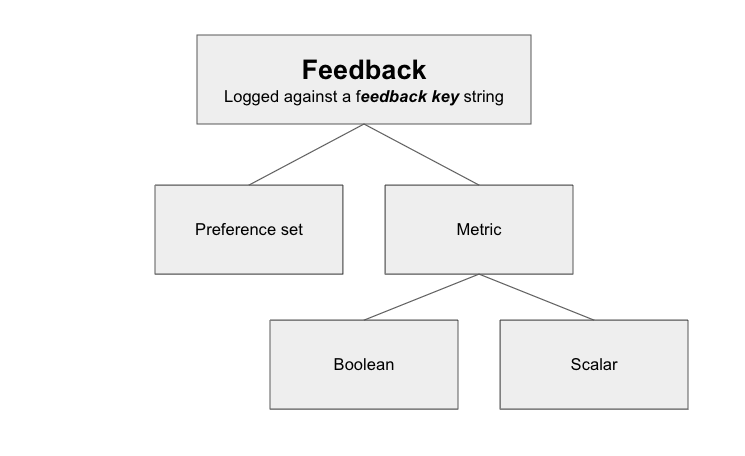
There are 2 types of feedback you can log: **metrics** and **preference sets**. A metric is a boolean or scalar value attached to an individual completion.
A preference set is a tuple of completions, where one is marked as preferred, and the other as dispreferred.
Taxonomy of feedback types in Adaptive Engine}>
 To [log feedback](/v0.8/interactions/feedback), you must first register a feedback key to log against.
If you want to associate a metric to a [use case](/v0.8/platform/use-cases) so you can later organize and analyze
aggregate performance or individual results associated with it, you can *link* the metric to the use case.
[Create](/v0.8/platform/authentication) an `Adaptive` client first
```python Register feedback key theme={null}
register_key = adaptive.feedback.register_key(
key="acceptance",
kind="bool",
scoring_type="higher_is_better",
)
```
See the [SDK Reference](https://adaptive-ml.github.io/adaptive-sdk-docs/adaptive_sdk/resources.html#Feedback.register_key) to see the full method definition.
## Metrics
Metrics are valuable when you can measure or quantify some dimension about a completion.
Examples of what those could be:
* immediate human feedback, such as acceptance/rejection of a completion
* downstream impact of a completion, such as customer churn or avoidance of it
* user satisfaction \[0-5] for a given conversation
* execution feedback for generated code, such as success/error
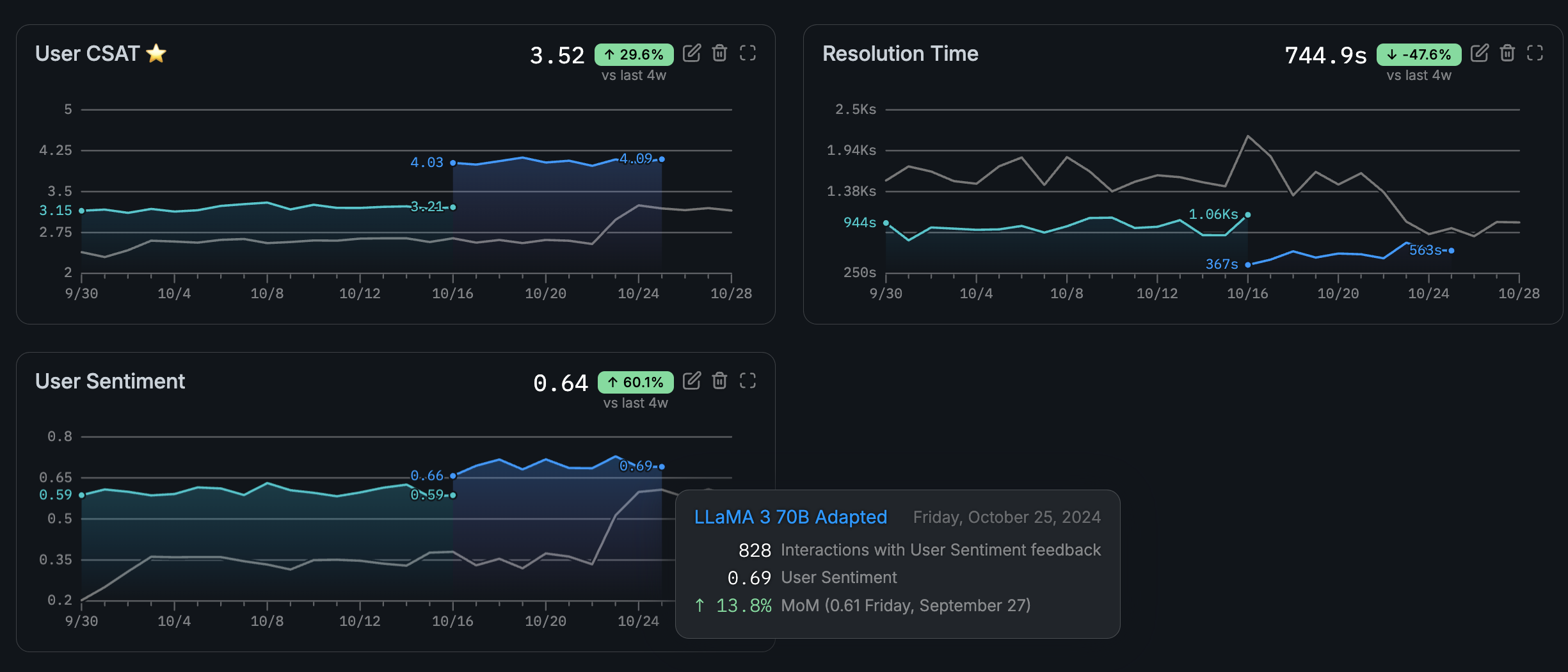
Since metrics have a quantifiable value, Adaptive allows you to track their progress across time,
helping you visualize the ongoing production feedback of newly trained models or prompting strategies beyond
static, point-in-time evaluations.
The Adaptive Engine UI allows you to track and monitor production feedback for your models against selected feedback keys}>
To [log feedback](/v0.8/interactions/feedback), you must first register a feedback key to log against.
If you want to associate a metric to a [use case](/v0.8/platform/use-cases) so you can later organize and analyze
aggregate performance or individual results associated with it, you can *link* the metric to the use case.
[Create](/v0.8/platform/authentication) an `Adaptive` client first
```python Register feedback key theme={null}
register_key = adaptive.feedback.register_key(
key="acceptance",
kind="bool",
scoring_type="higher_is_better",
)
```
See the [SDK Reference](https://adaptive-ml.github.io/adaptive-sdk-docs/adaptive_sdk/resources.html#Feedback.register_key) to see the full method definition.
## Metrics
Metrics are valuable when you can measure or quantify some dimension about a completion.
Examples of what those could be:
* immediate human feedback, such as acceptance/rejection of a completion
* downstream impact of a completion, such as customer churn or avoidance of it
* user satisfaction \[0-5] for a given conversation
* execution feedback for generated code, such as success/error
Since metrics have a quantifiable value, Adaptive allows you to track their progress across time,
helping you visualize the ongoing production feedback of newly trained models or prompting strategies beyond
static, point-in-time evaluations.
The Adaptive Engine UI allows you to track and monitor production feedback for your models against selected feedback keys}>
 ## Preference sets
Preference sets are useful when you cannot quantify your feedback, but only provide a relative judgement between 2 completions.
For example, you may be able to judge one completion as less toxic than another, but neither of them as toxic or not toxic individually.
Although preference sets are not plotted in the Adaptive UI, you may also use them for [preference fine-tuning](/v0.8/recipes/guides/training).
See [Log Feedback](/v0.8/interactions/feedback) to see how to use the Adaptive SDK to log feedback.
See the [SDK Reference](/v0.8/sdk-reference/reference) for all feedback-related methods.
## Log Feedback
All metric feedback must be logged against a `feedback_key` (see [Feedback](/v0.8/interactions/feedback)).
When you make an [inference request](/v0.8/inference/make_requests), the API response includes a `completion_id` UUID along with the
model’s output (see [Make inference requests](/v0.8/inference/make_requests) to learn more). You must log your feedback
for an output using its completion\_id.
Make sure to use the response’s `completion_id` for logging, not its `id`.
You can access the `completion_id` for a Chat API response as follows:
```python requests theme={null}
completion_id = response.json()["choices"][0]["completion_id"]
```
```python Adaptive SDK / OpenAI Python theme={null}
completion_id = response.choices[0].completion_id
```
If you are passing `stream=True` to the Chat API to stream completions, you can find the same `completion_id` in each streamed chunk as follows:
```python Adaptive SDK / OpenAI Python theme={null}
for chunk in streaming_response:
completion_id = chunk.choices[0].completion_id
```
## Log metric feedback
Metric feedback allows you to score a completion with scalar or boolean values.
For example, the code snippet below logs that Llama3.1 8B’s completion to your prompt scored a `CSAT` (customer satisfaction score) of 5.
[Create](/v0.8/platform/authentication) an `Adaptive` client first
```python Adaptive SDK theme={null}
response = adaptive.feedback.log_metric(
value=5,
feedback_key="CSAT",
completion_id=completion_id,
details="This answer was perfect" # optional text details of
)
```
```python requests theme={null}
import requests
headers = {"Authorization": "Bearer ADAPTIVE_API_KEY"}
payload = {
"value": 5,
"metric": "CSAT",
"completion_id" : completion_id,
"details": "This answer was perfect"
}
response = requests.post(
url="ADAPTIVE_URL/api/v1/feedback",
json=payload,
headers=headers
)
```
As exemplified in the above code snippets, you can log textual `details` for more context or justification on the provided feedback.
See the [SDK Reference](https://adaptive-ml.github.io/adaptive-sdk-docs/adaptive_sdk/resources.html#Feedback.log_metric) to see the full method definition.
## Log preference feedback
Preference feedback allows you to log a pairwise comparison between 2 completions. You can also log a tie between the 2, as equally good or equally bad.
```python Adaptive SDK theme={null}
response = adaptive.feedback.log_preference(
feedback_key="acceptance",
preferred_completion="completion_id_1",
other_completion="completion_id_2",
)
```
See the [SDK Reference](https://adaptive-ml.github.io/adaptive-sdk-docs/adaptive_sdk/resources.html#Feedback.log_preference) to see the full method definition.
## Preference sets
Preference sets are useful when you cannot quantify your feedback, but only provide a relative judgement between 2 completions.
For example, you may be able to judge one completion as less toxic than another, but neither of them as toxic or not toxic individually.
Although preference sets are not plotted in the Adaptive UI, you may also use them for [preference fine-tuning](/v0.8/recipes/guides/training).
See [Log Feedback](/v0.8/interactions/feedback) to see how to use the Adaptive SDK to log feedback.
See the [SDK Reference](/v0.8/sdk-reference/reference) for all feedback-related methods.
## Log Feedback
All metric feedback must be logged against a `feedback_key` (see [Feedback](/v0.8/interactions/feedback)).
When you make an [inference request](/v0.8/inference/make_requests), the API response includes a `completion_id` UUID along with the
model’s output (see [Make inference requests](/v0.8/inference/make_requests) to learn more). You must log your feedback
for an output using its completion\_id.
Make sure to use the response’s `completion_id` for logging, not its `id`.
You can access the `completion_id` for a Chat API response as follows:
```python requests theme={null}
completion_id = response.json()["choices"][0]["completion_id"]
```
```python Adaptive SDK / OpenAI Python theme={null}
completion_id = response.choices[0].completion_id
```
If you are passing `stream=True` to the Chat API to stream completions, you can find the same `completion_id` in each streamed chunk as follows:
```python Adaptive SDK / OpenAI Python theme={null}
for chunk in streaming_response:
completion_id = chunk.choices[0].completion_id
```
## Log metric feedback
Metric feedback allows you to score a completion with scalar or boolean values.
For example, the code snippet below logs that Llama3.1 8B’s completion to your prompt scored a `CSAT` (customer satisfaction score) of 5.
[Create](/v0.8/platform/authentication) an `Adaptive` client first
```python Adaptive SDK theme={null}
response = adaptive.feedback.log_metric(
value=5,
feedback_key="CSAT",
completion_id=completion_id,
details="This answer was perfect" # optional text details of
)
```
```python requests theme={null}
import requests
headers = {"Authorization": "Bearer ADAPTIVE_API_KEY"}
payload = {
"value": 5,
"metric": "CSAT",
"completion_id" : completion_id,
"details": "This answer was perfect"
}
response = requests.post(
url="ADAPTIVE_URL/api/v1/feedback",
json=payload,
headers=headers
)
```
As exemplified in the above code snippets, you can log textual `details` for more context or justification on the provided feedback.
See the [SDK Reference](https://adaptive-ml.github.io/adaptive-sdk-docs/adaptive_sdk/resources.html#Feedback.log_metric) to see the full method definition.
## Log preference feedback
Preference feedback allows you to log a pairwise comparison between 2 completions. You can also log a tie between the 2, as equally good or equally bad.
```python Adaptive SDK theme={null}
response = adaptive.feedback.log_preference(
feedback_key="acceptance",
preferred_completion="completion_id_1",
other_completion="completion_id_2",
)
```
See the [SDK Reference](https://adaptive-ml.github.io/adaptive-sdk-docs/adaptive_sdk/resources.html#Feedback.log_preference) to see the full method definition.