> ## Documentation Index
> Fetch the complete documentation index at: https://docs.adaptive-ml.com/llms.txt
> Use this file to discover all available pages before exploring further.
# Runs
> Execute a recipe by launching a run
## From The Adaptive UI
Runs are the instantiation of a running recipe. They are executed on the same underlying infrastructure where the Adaptive Engine compute plane is hosted.
To create a run from the Adaptive UI, you would:
1. Select the recipe that you want to run from the "Recipe" tab
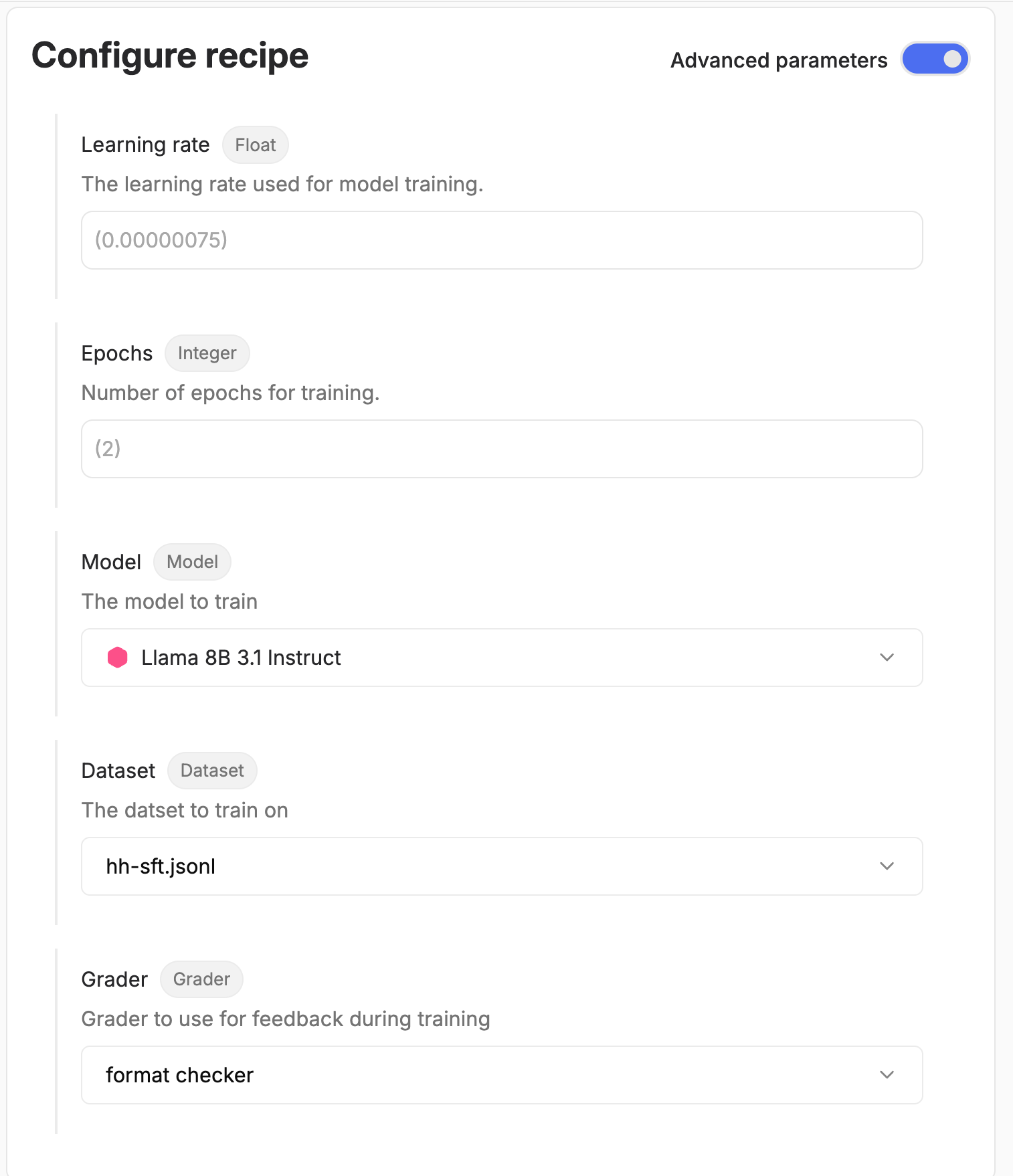
2. Specify values for the config. The Adaptive UI automatically create widgets to input values based on the types of your config fields (see the image below)
3. Review your recipe and launch the run
Below is an example of the UI to launch a simple recipe (see [Input configuration](/v0.7/recipes/guides/config) to learn how to create input configurations for your recipes).
Config parameters selection in the UI}>
 ## From the SDK
The Adaptive SDK provides a comprehensive interface for managing custom recipes. You can upload your recipe files, list existing recipes, and launch training jobs programmatically.
First, initialize the Adaptive SDK client:
```python theme={null}
from adaptive_sdk import Adaptive
# Initialize client
adaptive = Adaptive(
base_url="[ADAPTIVE_URL]",
api_key="[ADAPTIVE_API_KEY]"
)
# Set default use case (optional)
adaptive.set_default_use_case("my-use-case")
```
### Uploading Custom Recipes
Use `adaptive.recipes.upload()` to upload your recipe to the platform. Currently recipes are limited to single files.
```python theme={null}
# Upload a recipe file
recipe_data = client.recipes.upload(
file_path="/path/to/your/recipe.py",
recipe_key="my-recipe",
name="PPO Training Recipe"
)
print(f"Uploaded recipe with ID: {recipe_data.id}")
```
### Listing Recipes
Use `adaptive.recipes.list()` to view all available recipes.
To list all recipes:
```python theme={null}
# List all recipes in the default use case
recipes = adaptive.recipes.list()
for recipe in recipes:
print(f"Recipe: {recipe.name} (Key: {recipe.key})")
```
### Inspecting the input schema of a recipe
Use `adaptive.recipe.get()` to get a specific recipe's json schema.
You can construct your input parameters dict from this schema.
```python theme={null}
# Get recipe's json_schema
from pprint import pprint
schema = adaptive.recipes.get(recipe_key="my-recipe").json_schema
print(f"Recipe input schema:\n")
pprint(schema)
```
You can also generate a sample input dictionary from the json schema with mock data, to facilitate building your own (valid) input with `adaptive.recipe.generate_sample_input()`.
```python theme={null}
from pprint import pprint
# Get sample input dictionary to match recipe's input schema
mock_input = adaptive.generate_sample_input(recipe_key="my-recipe")
print(f"Sample recipe input dictionary:\n")
pprint(mock_input)
```
### Launching a Run
Use `adaptive.recipes.run()` to launch a run from a recipe.
Arguments to pass to the recipe config should be given in the `input_args` argument and should strictly adhere to the config defined in the recipe.
```python theme={null}
# Launch training with a dataset
job = adaptive.recipes.run(
recipe_key="my-recipe",
num_gpus=2,
name="My run",
input_args = {
"lr": 0.02,
"batch_size": 8,
"model": "llama-3.1-8b-instruct",
"dataset": "my-dataset-key",
"grader": "my-grader-key"
}
)
```
## From the SDK
The Adaptive SDK provides a comprehensive interface for managing custom recipes. You can upload your recipe files, list existing recipes, and launch training jobs programmatically.
First, initialize the Adaptive SDK client:
```python theme={null}
from adaptive_sdk import Adaptive
# Initialize client
adaptive = Adaptive(
base_url="[ADAPTIVE_URL]",
api_key="[ADAPTIVE_API_KEY]"
)
# Set default use case (optional)
adaptive.set_default_use_case("my-use-case")
```
### Uploading Custom Recipes
Use `adaptive.recipes.upload()` to upload your recipe to the platform. Currently recipes are limited to single files.
```python theme={null}
# Upload a recipe file
recipe_data = client.recipes.upload(
file_path="/path/to/your/recipe.py",
recipe_key="my-recipe",
name="PPO Training Recipe"
)
print(f"Uploaded recipe with ID: {recipe_data.id}")
```
### Listing Recipes
Use `adaptive.recipes.list()` to view all available recipes.
To list all recipes:
```python theme={null}
# List all recipes in the default use case
recipes = adaptive.recipes.list()
for recipe in recipes:
print(f"Recipe: {recipe.name} (Key: {recipe.key})")
```
### Inspecting the input schema of a recipe
Use `adaptive.recipe.get()` to get a specific recipe's json schema.
You can construct your input parameters dict from this schema.
```python theme={null}
# Get recipe's json_schema
from pprint import pprint
schema = adaptive.recipes.get(recipe_key="my-recipe").json_schema
print(f"Recipe input schema:\n")
pprint(schema)
```
You can also generate a sample input dictionary from the json schema with mock data, to facilitate building your own (valid) input with `adaptive.recipe.generate_sample_input()`.
```python theme={null}
from pprint import pprint
# Get sample input dictionary to match recipe's input schema
mock_input = adaptive.generate_sample_input(recipe_key="my-recipe")
print(f"Sample recipe input dictionary:\n")
pprint(mock_input)
```
### Launching a Run
Use `adaptive.recipes.run()` to launch a run from a recipe.
Arguments to pass to the recipe config should be given in the `input_args` argument and should strictly adhere to the config defined in the recipe.
```python theme={null}
# Launch training with a dataset
job = adaptive.recipes.run(
recipe_key="my-recipe",
num_gpus=2,
name="My run",
input_args = {
"lr": 0.02,
"batch_size": 8,
"model": "llama-3.1-8b-instruct",
"dataset": "my-dataset-key",
"grader": "my-grader-key"
}
)
```