> ## Documentation Index
> Fetch the complete documentation index at: https://docs.adaptive-ml.com/llms.txt
> Use this file to discover all available pages before exploring further.
# Connect proprietary models
> Connect models from external providers and invoke them through Adaptive Engine
Adaptive Engine enables you to connect proprietary models, so you can use them through the Adaptive API in tandem with other platform features - such as [A/B tests](/v0.5/guides/abtesting),
[interaction](/v0.5/guides/inference) and [feedback](/v0.5/guides/feedback) logging. The only requirement is that you supply a valid external API key.
This feature currently supports OpenAI (both via OpenAI's API and Azure OpenAI Service) and Google models.
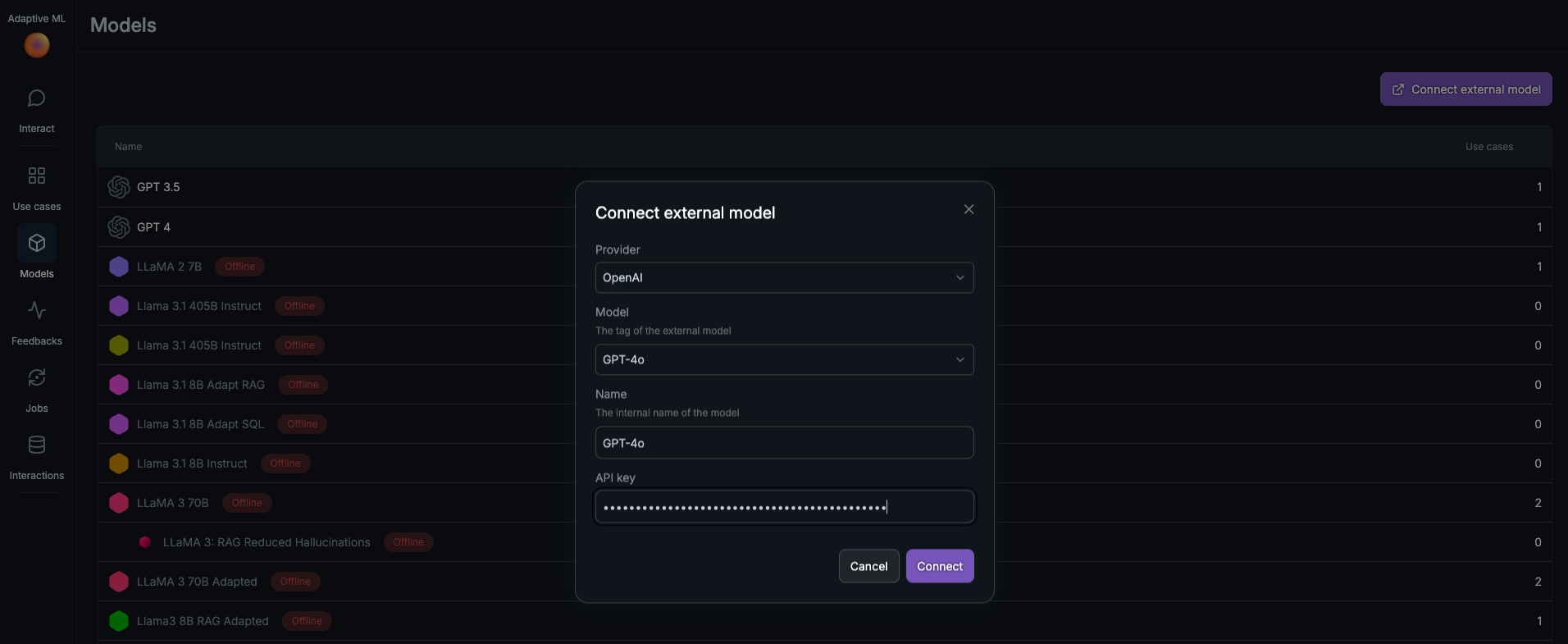
To connect an external model, click on *Connect external model* on the top right of the *Models* page in the Adaptive Engine UI.
The Connect external model wizard allows you to configure an external proprietary model connection in Adaptive Engine}>
 You can also connect an external model using the Adaptive SDK.
```python Adaptive SDK theme={null}
external_model = adaptive.models.add_external(
provider="open_ai",
external_model_id="GPT4O",
name="GPT-4o",
api_key="OPENAI_API_KEY"
)
```
Supported model ID's:
* `GPT4O`
* `GPT4O_MINI`
* `GPT4`
* `GPT4_TURBO`
* `GPT3_5_TURBO`
```python Adaptive SDK theme={null}
external_model = adaptive.models.add_external(
provider="azure",
external_model_id="DEPLOYMENT_NAME",
name="Azure GPT-4o",
api_key="AZURE_API_KEY",
endpoint="AZURE_OPENAI_SUBSCRIPTION_ENDPOINT"
)
```
When connecting a model through Azure OpenAI Service:
* the `external_model_id` should be the the deployment name/id of your model
* the `endpoint` should be your Azure OpenAI subscription endpoint, which should
look something like `https://aoairesource.openai.azure.com`.
See [here](https://learn.microsoft.com/en-us/azure/ai-services/openai/reference#uri-parameters) for more information.
```python Adaptive SDK theme={null}
external_model = adpt_client.models.add_external(
provider="google",
external_model_id="gemini-1.5-pro",
name="Gemini 1.5 Pro",
api_key="GOOGLE_API_KEY"
)
```
Supported model ID's are the ones listed in [this](https://ai.google.dev/gemini-api/docs/models/gemini#model-variations) table, with the exception of embeddings models.
***
Once the proprietary model is connected to Adaptive Engine, you can [attach it to a use-case](/v0.5/concepts/models)
and [make inference requests](/v0.5/guides/inference) the same way you would for any other Adaptive Engine model.
You can also connect an external model using the Adaptive SDK.
```python Adaptive SDK theme={null}
external_model = adaptive.models.add_external(
provider="open_ai",
external_model_id="GPT4O",
name="GPT-4o",
api_key="OPENAI_API_KEY"
)
```
Supported model ID's:
* `GPT4O`
* `GPT4O_MINI`
* `GPT4`
* `GPT4_TURBO`
* `GPT3_5_TURBO`
```python Adaptive SDK theme={null}
external_model = adaptive.models.add_external(
provider="azure",
external_model_id="DEPLOYMENT_NAME",
name="Azure GPT-4o",
api_key="AZURE_API_KEY",
endpoint="AZURE_OPENAI_SUBSCRIPTION_ENDPOINT"
)
```
When connecting a model through Azure OpenAI Service:
* the `external_model_id` should be the the deployment name/id of your model
* the `endpoint` should be your Azure OpenAI subscription endpoint, which should
look something like `https://aoairesource.openai.azure.com`.
See [here](https://learn.microsoft.com/en-us/azure/ai-services/openai/reference#uri-parameters) for more information.
```python Adaptive SDK theme={null}
external_model = adpt_client.models.add_external(
provider="google",
external_model_id="gemini-1.5-pro",
name="Gemini 1.5 Pro",
api_key="GOOGLE_API_KEY"
)
```
Supported model ID's are the ones listed in [this](https://ai.google.dev/gemini-api/docs/models/gemini#model-variations) table, with the exception of embeddings models.
***
Once the proprietary model is connected to Adaptive Engine, you can [attach it to a use-case](/v0.5/concepts/models)
and [make inference requests](/v0.5/guides/inference) the same way you would for any other Adaptive Engine model.