> ## Documentation Index
> Fetch the complete documentation index at: https://docs.adaptive-ml.com/llms.txt
> Use this file to discover all available pages before exploring further.
# Overview
> A rundown of Adaptive Engine and all its components
Taxonomy of Adaptive Engine components.}>
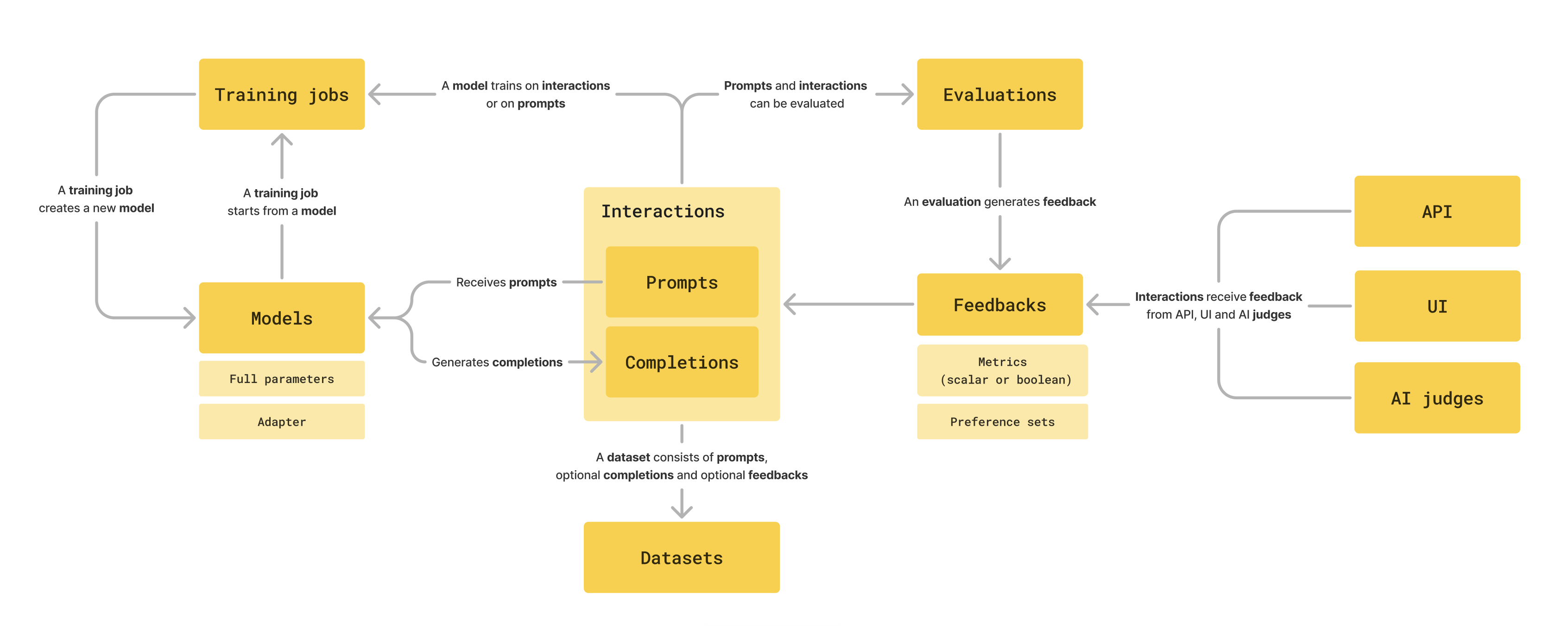 Here is an overview of Adaptive Engine's taxonomy, linking to other pages for deeper dives:
* At the center of the platform are [interactions](/v0.5/concepts/interactions) - pairs of prompts and completions generated by models.
These traces are automatically logged in Adaptive Engine, and can be explored in the Adaptive Engine interaction store. The interaction store is visible on the left panel of your Adaptive Engine UI.
* Datasets are collections of prompts, optionally with completions and feedbacks, that can be uploaded to the platform. You can use datasets for evaluation and training.
* [Models](/v0.5/concepts/models) can be full parameter artifacts or lightweight adapters. Adaptive Engine model form factor flexibility enables broader and deeper personalization with no sacrifice on inference efficiency.
* [Training jobs](/v0.5/fine-tuning/adapt) train a model on existing data and produce a new model as output, which can
be directly deployed and invoked for inference.
* Evaluations allow you to assess and drill down on your model's performance, and can run on both live interactions
to help you make real-life deployment decisions ([AB Tests](/v0.5/guides/abtesting)), or on offline data.
* [Feedbacks](/v0.5/guides/feedback) are at the center of the data flywheel; they can come from humans (logged via UI or API),
from systems (for example logging click or code execution results with the Adaptive SDK), or from AI judges.
Here is an overview of Adaptive Engine's taxonomy, linking to other pages for deeper dives:
* At the center of the platform are [interactions](/v0.5/concepts/interactions) - pairs of prompts and completions generated by models.
These traces are automatically logged in Adaptive Engine, and can be explored in the Adaptive Engine interaction store. The interaction store is visible on the left panel of your Adaptive Engine UI.
* Datasets are collections of prompts, optionally with completions and feedbacks, that can be uploaded to the platform. You can use datasets for evaluation and training.
* [Models](/v0.5/concepts/models) can be full parameter artifacts or lightweight adapters. Adaptive Engine model form factor flexibility enables broader and deeper personalization with no sacrifice on inference efficiency.
* [Training jobs](/v0.5/fine-tuning/adapt) train a model on existing data and produce a new model as output, which can
be directly deployed and invoked for inference.
* Evaluations allow you to assess and drill down on your model's performance, and can run on both live interactions
to help you make real-life deployment decisions ([AB Tests](/v0.5/guides/abtesting)), or on offline data.
* [Feedbacks](/v0.5/guides/feedback) are at the center of the data flywheel; they can come from humans (logged via UI or API),
from systems (for example logging click or code execution results with the Adaptive SDK), or from AI judges.