> ## Documentation Index
> Fetch the complete documentation index at: https://docs.adaptive-ml.com/llms.txt
> Use this file to discover all available pages before exploring further.
# API Authentication
> Authenticate your requests to Adaptive
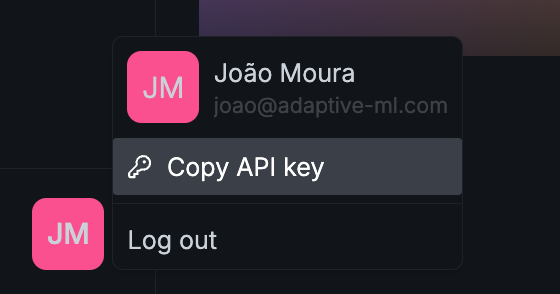
The Adaptive Engine API uses API keys for authentication. You can find your personal API key on the **bottom left** of the Adaptive UI by clicking your user profile icon.
You can copy your API key from the bottom left of the Adaptive UI.} style={{ width: '350px', margin: '0 auto' }}>
 All API requests should include your API key in an `Authorization` HTTP Header as such:
```
Authorization: Bearer ADAPTIVE_API_KEY
```
The Adaptive Python SDK allows you configure your API key on instantiation of the `Adaptive` client, as such:
```Python Adaptive SDK theme={null}
from adaptive_sdk import Adaptive
adaptive = Adaptive(base_url="ADAPTIVE_URL", api_key="ADAPTIVE_API_KEY")
```
You can also set an environment variable `$ADAPTIVE_API_KEY` instead of explicitly passing it to the `Adaptive` client.
If you are using the OpenAI Python library to [make inference requests](/v0.5/guides/inference), you can configure the OpenAI Client as such:
```Python OpenAI Python theme={null}
from openai import Client
oai_client = Client(
base_url="ADAPTIVE_URL/api/v1",
api_key="ADAPTIVE_API_KEY",
)
```
All API requests should include your API key in an `Authorization` HTTP Header as such:
```
Authorization: Bearer ADAPTIVE_API_KEY
```
The Adaptive Python SDK allows you configure your API key on instantiation of the `Adaptive` client, as such:
```Python Adaptive SDK theme={null}
from adaptive_sdk import Adaptive
adaptive = Adaptive(base_url="ADAPTIVE_URL", api_key="ADAPTIVE_API_KEY")
```
You can also set an environment variable `$ADAPTIVE_API_KEY` instead of explicitly passing it to the `Adaptive` client.
If you are using the OpenAI Python library to [make inference requests](/v0.5/guides/inference), you can configure the OpenAI Client as such:
```Python OpenAI Python theme={null}
from openai import Client
oai_client = Client(
base_url="ADAPTIVE_URL/api/v1",
api_key="ADAPTIVE_API_KEY",
)
```