> ## Documentation Index
> Fetch the complete documentation index at: https://docs.adaptive-ml.com/llms.txt
> Use this file to discover all available pages before exploring further.
# Authentication
> Configure API access, service accounts, and HTTP requests
## Find your credentials
You need two values from your Adaptive deployment:
| Credential | Description |
| ------------------ | --------------------- |
| `ADAPTIVE_URL` | Your deployment URL |
| `ADAPTIVE_API_KEY` | Your personal API key |
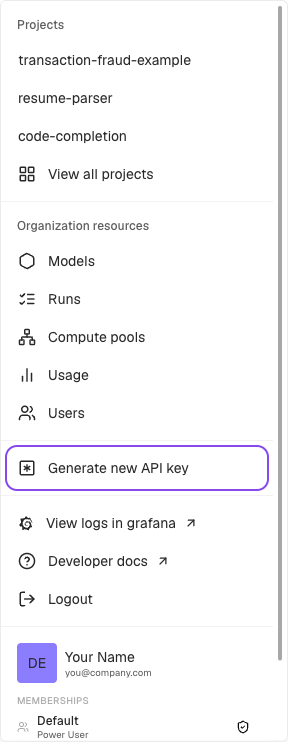
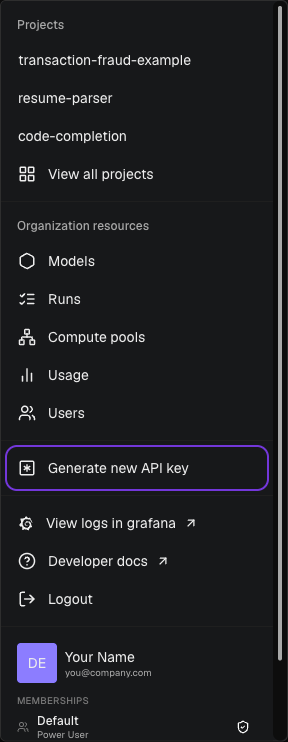 Click the navigation switcher in the top left corner (labeled *View all projects*) and select **Generate new API key**. Your deployment URL is provided by your administrator.
## Set environment variables
```bash theme={null}
export ADAPTIVE_URL="https://your-deployment.adaptive-ml.com"
export ADAPTIVE_API_KEY="your-api-key"
```
The SDK and HTTP clients use these environment variables to connect to Adaptive.
## Service accounts
Create service accounts for CI/CD pipelines, automation, and programmatic integrations that don't belong to a human user.
```python theme={null}
result = adaptive.users.create_service_account(
name="ci-bot",
teams_with_role=[("engineering", "power_user")]
)
# result.api_key is returned once; store it securely
```
The API key is returned once at creation and cannot be retrieved later. Store it immediately.
Authenticate the same way as personal accounts: set `ADAPTIVE_API_KEY` to the returned key. Service accounts follow the same role and team permission model as regular users.
Use the OpenAI Python library with your Adaptive deployment:
```python theme={null}
import os
from openai import OpenAI
client = OpenAI(
base_url=f"{os.environ['ADAPTIVE_URL']}/api/v1",
api_key=os.environ["ADAPTIVE_API_KEY"],
)
response = client.chat.completions.create(
model="project_key/model_key",
messages=[{"role": "user", "content": "Hello!"}],
)
```
Set `model` to `project_key/model_key`.
Include your API key in the `Authorization` header:
```
Authorization: Bearer ADAPTIVE_API_KEY
```
```bash theme={null}
curl "$ADAPTIVE_URL/api/v1/chat/completions" \
-X POST \
-H "Content-Type: application/json" \
-H "Authorization: Bearer $ADAPTIVE_API_KEY" \
-d '{
"model": "project_key/model_key",
"messages": [{"role": "user", "content": "Hello!"}]
}'
```
Click the navigation switcher in the top left corner (labeled *View all projects*) and select **Generate new API key**. Your deployment URL is provided by your administrator.
## Set environment variables
```bash theme={null}
export ADAPTIVE_URL="https://your-deployment.adaptive-ml.com"
export ADAPTIVE_API_KEY="your-api-key"
```
The SDK and HTTP clients use these environment variables to connect to Adaptive.
## Service accounts
Create service accounts for CI/CD pipelines, automation, and programmatic integrations that don't belong to a human user.
```python theme={null}
result = adaptive.users.create_service_account(
name="ci-bot",
teams_with_role=[("engineering", "power_user")]
)
# result.api_key is returned once; store it securely
```
The API key is returned once at creation and cannot be retrieved later. Store it immediately.
Authenticate the same way as personal accounts: set `ADAPTIVE_API_KEY` to the returned key. Service accounts follow the same role and team permission model as regular users.
Use the OpenAI Python library with your Adaptive deployment:
```python theme={null}
import os
from openai import OpenAI
client = OpenAI(
base_url=f"{os.environ['ADAPTIVE_URL']}/api/v1",
api_key=os.environ["ADAPTIVE_API_KEY"],
)
response = client.chat.completions.create(
model="project_key/model_key",
messages=[{"role": "user", "content": "Hello!"}],
)
```
Set `model` to `project_key/model_key`.
Include your API key in the `Authorization` header:
```
Authorization: Bearer ADAPTIVE_API_KEY
```
```bash theme={null}
curl "$ADAPTIVE_URL/api/v1/chat/completions" \
-X POST \
-H "Content-Type: application/json" \
-H "Authorization: Bearer $ADAPTIVE_API_KEY" \
-d '{
"model": "project_key/model_key",
"messages": [{"role": "user", "content": "Hello!"}]
}'
```