> ## Documentation Index
> Fetch the complete documentation index at: https://docs.adaptive-ml.com/llms.txt
> Use this file to discover all available pages before exploring further.
# Progress reporting
> Report the progress of your recipe to Adaptive
## Overview
Progress reporting allows you to track and display the progress of your recipe's execution in Adaptive Engine. This is useful for long-running recipes where you want to monitor how much work has been completed and how much remains.
Progress reporting consists of two main components:
1. **Define stages**: Define logical phases of your recipe execution up-front
2. **Update progress**: Report completion status for each stage
## Defining Stages
Use `ctx.job.register_stages()` to define the stages of your recipe:
```python theme={null}
# Register recipe stages
from adaptive_harmony.runtime import recipe_main, RecipeContext
@recipe_main
async def main(ctx: RecipeContext):
stages = ["Generating completions", "Evaluating completions"]
ctx.job.register_stages(stages)
```
Stages are displayed in the order they are registered and represent logical phases of your recipe execution.
## Reporting Progress
### Generic notifier
Adaptive Engine provides a simple interface to report progress, which you can access via `RecipeContext` (generally shown as the `ctx` input parameter):
```python theme={null}
# for training progress report
stage = "Generating grades"
total = 1000
current = 50
ctx.job.report_progress(stage, total, current)
```
This will update the Adaptive run details UI to show you are now at 5% completion on the "Generating grades" stage (50/1000 are done).
### Stage-specific notifier
If you don't want to constantly pass a "stage" parameter, you can create a `StageNotifier`, which is a copy of `ctx.job` that holds a default stage. All[Training classes](/v0.11/advanced/custom-recipes/training#trainers) take in an optional `stage_notifier` parameter, which - as the name indicates - must be a stage-bounded notifier. This means you can follow the progress of training in # training samples processed from the Adaptive UI without having to edit the Trainer classes.
```python theme={null}
from adaptive_harmony.common import GRPO
stage_notifier = ctx.job.stage_notifier(stage="GRPO Training")
trainer = GRPO(
...,
stage_notifier=stage_notifier,
...
)
```
### Single even notifications
Finally, it's frequent that you just want to report that something happened in your recipe, not necessarily that "# X out of a total # Y" samples/steps have been processed. A good example is reporting that a model has been spawned, which is a milestone in the recipe, but is a single action. For these cases, to decrease code verbosity you can use the `SimpleProgressNotifier` progress manager:
```python theme={null}
from adaptive_harmony.runtime import SimpleProgressNotifier
async with SimpleProgressNotifier(ctx.job.stage_notifier("Spawning judge model")):
judge = await ctx.client.model("model_registry://llama-3.3-70b").spawn_inference("judge")
```
`SimpleProgressNotifier` works in both synchronous and asynchronous contexts.
## Visualizing progress on the Adaptive UI
Once you have define your progress reporting strategy, uploaded and launched your recipe, the stages and progress will be displayed as below in the adaptive Engine:
Progress visualization of a run on the Adaptive Engine}>
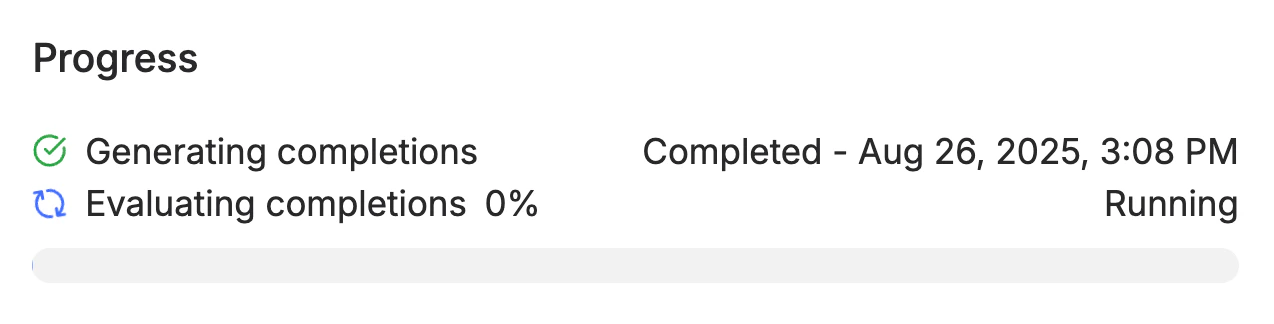 The example above illustrate the reporting defined with the code below:
```python theme={null}
from adaptive_harmony.runtime import recipe_main, RecipeContext
@recipe_main
async def recipe(config: EvalConfig, ctx: RecipeContext):
# load dataset...
# spawn models...
# Register recipe stages
inference_stage, eval_stage = "Generating completions", "Evaluating completions"
stages = [inference_stage, eval_stage]
ctx.job.register_stages(stages)
batch_size = 20
# batch method not implemented here
inference_batches = batch(dataset, batch_size=batch_size)
completions = []
for i, batch in inference_batches:
completions.extend([model.generate(thread) for thread in batch])
ctx.job.report_progress(inference_stage, len(dataset), i * batch_size + len(batch))
eval_batches = batch(completions, batch_size=batch_size)
grades = []
for i, batch in eval_batches:
grades.extend([grader.grade(thread) for thread in batch])
ctx.job.report_progress(
eval_stage,
len(completions),
i * batch_size + len(batch)
)
print("Recipe finished")
```
The example above illustrate the reporting defined with the code below:
```python theme={null}
from adaptive_harmony.runtime import recipe_main, RecipeContext
@recipe_main
async def recipe(config: EvalConfig, ctx: RecipeContext):
# load dataset...
# spawn models...
# Register recipe stages
inference_stage, eval_stage = "Generating completions", "Evaluating completions"
stages = [inference_stage, eval_stage]
ctx.job.register_stages(stages)
batch_size = 20
# batch method not implemented here
inference_batches = batch(dataset, batch_size=batch_size)
completions = []
for i, batch in inference_batches:
completions.extend([model.generate(thread) for thread in batch])
ctx.job.report_progress(inference_stage, len(dataset), i * batch_size + len(batch))
eval_batches = batch(completions, batch_size=batch_size)
grades = []
for i, batch in eval_batches:
grades.extend([grader.grade(thread) for thread in batch])
ctx.job.report_progress(
eval_stage,
len(completions),
i * batch_size + len(batch)
)
print("Recipe finished")
```