> ## Documentation Index
> Fetch the complete documentation index at: https://docs.adaptive-ml.com/llms.txt
> Use this file to discover all available pages before exploring further.
# Create an evaluation recipe
> Write your own recipe for model evaluation, and log eval artifacts to the product
Writing an evaluation recipe requires three main components:
2. **A dataset** - Data to evaluate the models on
3. **Models to evaluate** - The models you want to assess
4. **Graders** - Functions that will score the model outputs
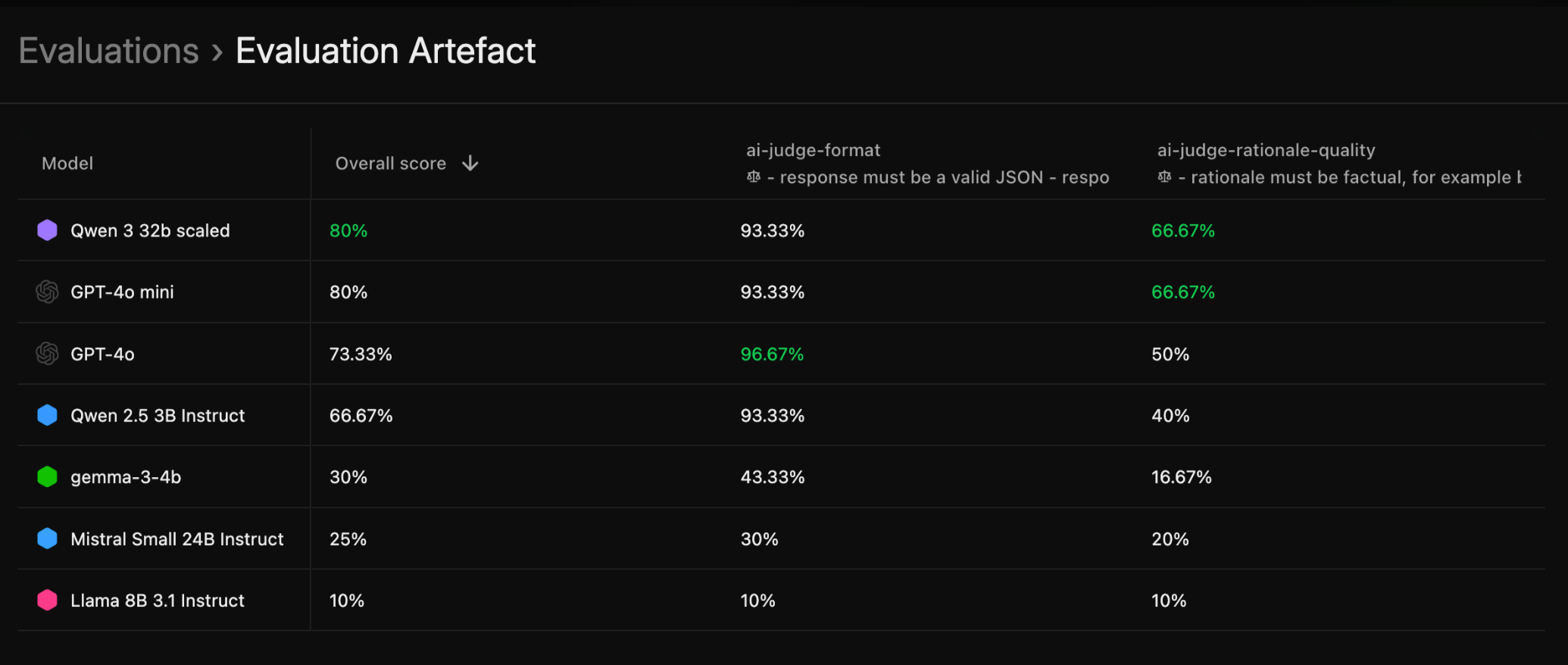
An Evaluation recipe should produce an `EvaluationArtifact`, which will be populated with several `EvalSample` (evaluated model's completions with attached grades). When you visit the Adaptive UI, and `EvaluationArtifact` will show aggregate evaluation scores per model on all Graders selected/created in the evaluation.
## Evaluation Recipe Structure
In the previous sections, we omit wrapping all methods in the main function decorated with @recipe\_main (see context [here](/v0.11/advanced/custom-recipes/intro_syntax)) for readability. Assume all the following code is in the main function. Also, check [Parametrize recipe inputs](/v0.11/advanced/custom-recipes/config) to learn how to build the recipe `config` with datasets, models and graders we refer to in the next steps.
### 1. Load a Dataset
```python theme={null}
# Load from Adaptive
dataset = config.dataset.load_dataset(ctx)
```
### 2. Spawn models and generate completions
To evaluate your models, you'll generate a list of `EvalSampleInteraction` by spawning each model, running inference to obtain completions, and collecting the results.
Use the `spawn_inference` method to create an inference instance for each model. After generating completions, deallocate the model to optimize memory usage.
```python theme={null}
from adaptive_harmony import EvalSampleInteraction, Grade
from adaptive_harmony.core.utils import async_map_fallible
interactions: list[EvalSampleInteraction] = []
# models_to_evaluate is a Set[AdaptiveModel]
for model_config in config.models_to_evaluate:
model_path = model_config.path
model = (
await client.model(model_config.path)
.spawn_inference(model_config.model_key)
)
completions = await async_map_fallible(model.generate, dataset)
interactions.extend(
[
EvalSampleInteraction(
thread=thread,
source=model_config.model_key,
)
for thread in completions
]
)
# remove the model from GPU
await model.dealloc()
```
The `async_map_fallible` is an util function that concurrently processes all samples and skips completions with errors (when for example the sample is too big for the model's maximum sequence length).
### 3. Spawn graders and grade completions
To evaluate model outputs, we need to create/setup graders, and use them to grade each model's completions.
Each Grader produces a [Grade](/v0.11/advanced/custom-recipes/graders#grade-object) for each sample.
```python theme={null}
from adaptive_harmony import EvalSample
from adaptive_harmony.graders import Grader
# Create graders from config
graders = [Grader.from_config(grader, client) for grader in config.graders]
# Define eval samples with empty grades
eval_samples = [
EvalSample(
interaction=interaction,
grades=[],
dataset_key=config.dataset.file,
) for interaction in interactions
]
# Grade eval samples
for grader in graders:
await grader.setup()
for eval_sample in eval_samples:
grade = await grader.grade(eval_sample.interaction.thread)
current_grades = eval_sample.grades
current_grades.append(grade)
eval_sample.grades = current_grades
```
If you defined a [custom Recipe Grader](/v0.11/advanced/custom-recipes/graders) in this eval recipe, you could add it to the `graders` list above, have its grades added to `eval_samples` and later shown in the UI. If the `grader_key` you hardcode for you recipe grader does not exist yet in the platform, it will be automatically created and reported in the evaluation results; no need to pre-create the recipe grader.
### 4. Output an EvaluationArtifact
Now that all samples are graded, you can create an `EvaluationArtifact` and populate it with your `EvalSamples`.
You do not need to push this to Adaptive with a specific method; the Adaptive Engine automatically detects that an `EvaluationArtifact` was written in the course of the recipe's execution, registering and displaying it in the UI once the run is complete.
```python theme={null}
# Create evaluation artifact
eval_artifact = EvaluationArtifact(name="Evaluation Artifact", ctx=ctx)
eval_artifact.add_samples(eval_samples)
```
Evaluation table, result of saving an EvaluationArtifact}>
 ## Complete Evaluation Recipe Example
Here's a complete example combining all the concepts:
```python theme={null}
from pydantic import Field
from typing import Annotated
from loguru import logger
from adaptive_harmony import StringThread, EvalSample, EvalSampleInteraction, EvaluationArtifact
from adaptive_harmony.runtime import (
AdaptiveModel,
AdaptiveDataset,
AdaptiveGrader,
InputConfig,
RecipeContext,
recipe_main,
)
from adaptive_harmony.graders import Grader
class EvalConfig(InputConfig):
dataset: Annotated[AdaptiveDataset, Field(description="Dataset to evaluate on")]
model_1: Annotated[AdaptiveModel, Field(description="First model to evaluate")]
model_2: Annotated[AdaptiveModel, Field(description="Second model to evaluate")]
tp_1: Annotated[int, Field(description="Tensor parallel degree for model 1", default=1)]
tp_2: Annotated[int, Field(description="Tensor parallel degree for model 2", default=1)]
graders: Annotated[
list[AdaptiveGrader],
Field(description="List of graders to evaluate models with"),
]
@recipe_main
async def complete_evaluation_recipe(config: EvalConfig, ctx: RecipeContext):
client = ctx.client
# 1. Load dataset
logger.info("Loading dataset...")
dataset = config.dataset.load_dataset(ctx)
logger.info(f"Loaded {len(dataset)} samples")
# 2. Spawn models and run completions
logger.info("Running inference for both models...")
model_1 = await client.model(config.model_1.path).tp(config.tp_1).spawn_inference("evaluated_model_1")
model_2 = await client.model(config.model_2.path).tp(config.tp_2).spawn_inference("evaluated_model_2")
completions_1 = await model_1.generate(dataset)
completions_2 = await model_2.generate(dataset)
logger.info(f"Generated {len(completions_1)} completions for model 1")
logger.info(f"Generated {len(completions_2)} completions for model 2")
# Deallocate models to free GPU resources
await model_1.dealloc()
await model_2.dealloc()
# 3. Spawn graders and grade completions
logger.info("Setting up graders...")
graders = [Grader.from_config(grader, client) for grader in config.graders]
eval_samples = []
for grader in graders:
await grader.setup()
logger.info(f"Running {grader.grader_key} grader...")
# Grade model 1 completions
for completion in completions_1:
grade = await grader.grade(completion)
eval_sample = EvalSample(
interaction=EvalSampleInteraction(
thread=completion,
source="model_1"
),
grades=[grade],
dataset_key=config.dataset.file,
)
eval_samples.append(eval_sample)
# Grade model 2 completions
for completion in completions_2:
grade = await grader.grade(completion)
eval_sample = EvalSample(
interaction=EvalSampleInteraction(
thread=completion,
source="model_2"
),
grades=[grade],
dataset_key=config.dataset.file,
)
eval_samples.append(eval_sample)
# 4. Create evaluation artifact
eval_artifact = EvaluationArtifact(name="Evaluation Artifact", ctx=ctx)
eval_artifact.add_samples(eval_samples)
logger.info(f"Evaluation completed! Created {len(eval_samples)} eval samples")
```
## Key Components Explained
### Evaluation Samples
Each evaluation sample contains:
* **Interaction**: The model's response and source model key
* **Grades**: Grades from all graders
* **Dataset ID**: Reference to the source dataset
### Graders
Graders can be:
* **AI Judge Graders**: Use LLMs to score responses
* **Rule-based Graders**: Apply predefined criteria
* **Combined Graders**: Aggregate multiple grader scores
### Evaluation Artifact
The `EvaluationArtifact` class:
* Collects all evaluation results
* Provides methods to analyze and export results
* Integrates with the Adaptive platform for result tracking
## Best Practices
1. **Model Management**: Always deallocate models after use to free resources
2. **Error Handling**: Use proper error handling for robust evaluation
3. **Progress Tracking**: Provide clear logging for debugging and monitoring
4. **Resource Cleanup**: Properly clean up graders and models
## Complete Evaluation Recipe Example
Here's a complete example combining all the concepts:
```python theme={null}
from pydantic import Field
from typing import Annotated
from loguru import logger
from adaptive_harmony import StringThread, EvalSample, EvalSampleInteraction, EvaluationArtifact
from adaptive_harmony.runtime import (
AdaptiveModel,
AdaptiveDataset,
AdaptiveGrader,
InputConfig,
RecipeContext,
recipe_main,
)
from adaptive_harmony.graders import Grader
class EvalConfig(InputConfig):
dataset: Annotated[AdaptiveDataset, Field(description="Dataset to evaluate on")]
model_1: Annotated[AdaptiveModel, Field(description="First model to evaluate")]
model_2: Annotated[AdaptiveModel, Field(description="Second model to evaluate")]
tp_1: Annotated[int, Field(description="Tensor parallel degree for model 1", default=1)]
tp_2: Annotated[int, Field(description="Tensor parallel degree for model 2", default=1)]
graders: Annotated[
list[AdaptiveGrader],
Field(description="List of graders to evaluate models with"),
]
@recipe_main
async def complete_evaluation_recipe(config: EvalConfig, ctx: RecipeContext):
client = ctx.client
# 1. Load dataset
logger.info("Loading dataset...")
dataset = config.dataset.load_dataset(ctx)
logger.info(f"Loaded {len(dataset)} samples")
# 2. Spawn models and run completions
logger.info("Running inference for both models...")
model_1 = await client.model(config.model_1.path).tp(config.tp_1).spawn_inference("evaluated_model_1")
model_2 = await client.model(config.model_2.path).tp(config.tp_2).spawn_inference("evaluated_model_2")
completions_1 = await model_1.generate(dataset)
completions_2 = await model_2.generate(dataset)
logger.info(f"Generated {len(completions_1)} completions for model 1")
logger.info(f"Generated {len(completions_2)} completions for model 2")
# Deallocate models to free GPU resources
await model_1.dealloc()
await model_2.dealloc()
# 3. Spawn graders and grade completions
logger.info("Setting up graders...")
graders = [Grader.from_config(grader, client) for grader in config.graders]
eval_samples = []
for grader in graders:
await grader.setup()
logger.info(f"Running {grader.grader_key} grader...")
# Grade model 1 completions
for completion in completions_1:
grade = await grader.grade(completion)
eval_sample = EvalSample(
interaction=EvalSampleInteraction(
thread=completion,
source="model_1"
),
grades=[grade],
dataset_key=config.dataset.file,
)
eval_samples.append(eval_sample)
# Grade model 2 completions
for completion in completions_2:
grade = await grader.grade(completion)
eval_sample = EvalSample(
interaction=EvalSampleInteraction(
thread=completion,
source="model_2"
),
grades=[grade],
dataset_key=config.dataset.file,
)
eval_samples.append(eval_sample)
# 4. Create evaluation artifact
eval_artifact = EvaluationArtifact(name="Evaluation Artifact", ctx=ctx)
eval_artifact.add_samples(eval_samples)
logger.info(f"Evaluation completed! Created {len(eval_samples)} eval samples")
```
## Key Components Explained
### Evaluation Samples
Each evaluation sample contains:
* **Interaction**: The model's response and source model key
* **Grades**: Grades from all graders
* **Dataset ID**: Reference to the source dataset
### Graders
Graders can be:
* **AI Judge Graders**: Use LLMs to score responses
* **Rule-based Graders**: Apply predefined criteria
* **Combined Graders**: Aggregate multiple grader scores
### Evaluation Artifact
The `EvaluationArtifact` class:
* Collects all evaluation results
* Provides methods to analyze and export results
* Integrates with the Adaptive platform for result tracking
## Best Practices
1. **Model Management**: Always deallocate models after use to free resources
2. **Error Handling**: Use proper error handling for robust evaluation
3. **Progress Tracking**: Provide clear logging for debugging and monitoring
4. **Resource Cleanup**: Properly clean up graders and models